

One-Click Sync X/Twitter Bookmarks & Tweets to Notion
Organize and back up your Twitter knowledge base. New bookmarks and tweets sync automatically, no extra clicks needed.
AI Classification · Tweets · Threads · Articles · Images · Videos
Supports Chrome and Edge browsers, not available on mobile
A Twitter Sync Tool Built for Information Managers
Stable sync, zero hassle, focus on creating and reusing. Turn X/Twitter tweets into your Notion knowledge base.
AI Smart Classification
Supports OpenAI, Gemini, DeepSeek, Qwen and other AI models to automatically classify and tag tweets. No manual sorting needed. Requires your own API Key.
Incremental Auto-Sync
Set up once, works forever. Automatically detects new bookmarks and tweets via Chrome scheduled tasks, incrementally syncing to Notion.
All Tweet Types Supported
Short tweets, long tweets (Note Tweet), Thread chains, X Articles — all fully synced to Notion.
Image & Video Sync
Tweet images fully uploaded to Notion, embedded links preserved.
Smart Tag Processing
Automatically extracts tweet hashtags, deduplicates and optimizes, up to 3 tags. Supports AI auto-tagging.
Professional Notion Template
Pre-built linked tables for tweets, categories, tags, and authors — a ready-to-use tweet management system.
Sync Preview
See how X/Twitter tweets are perfectly synced to Notion, preserving all important information.
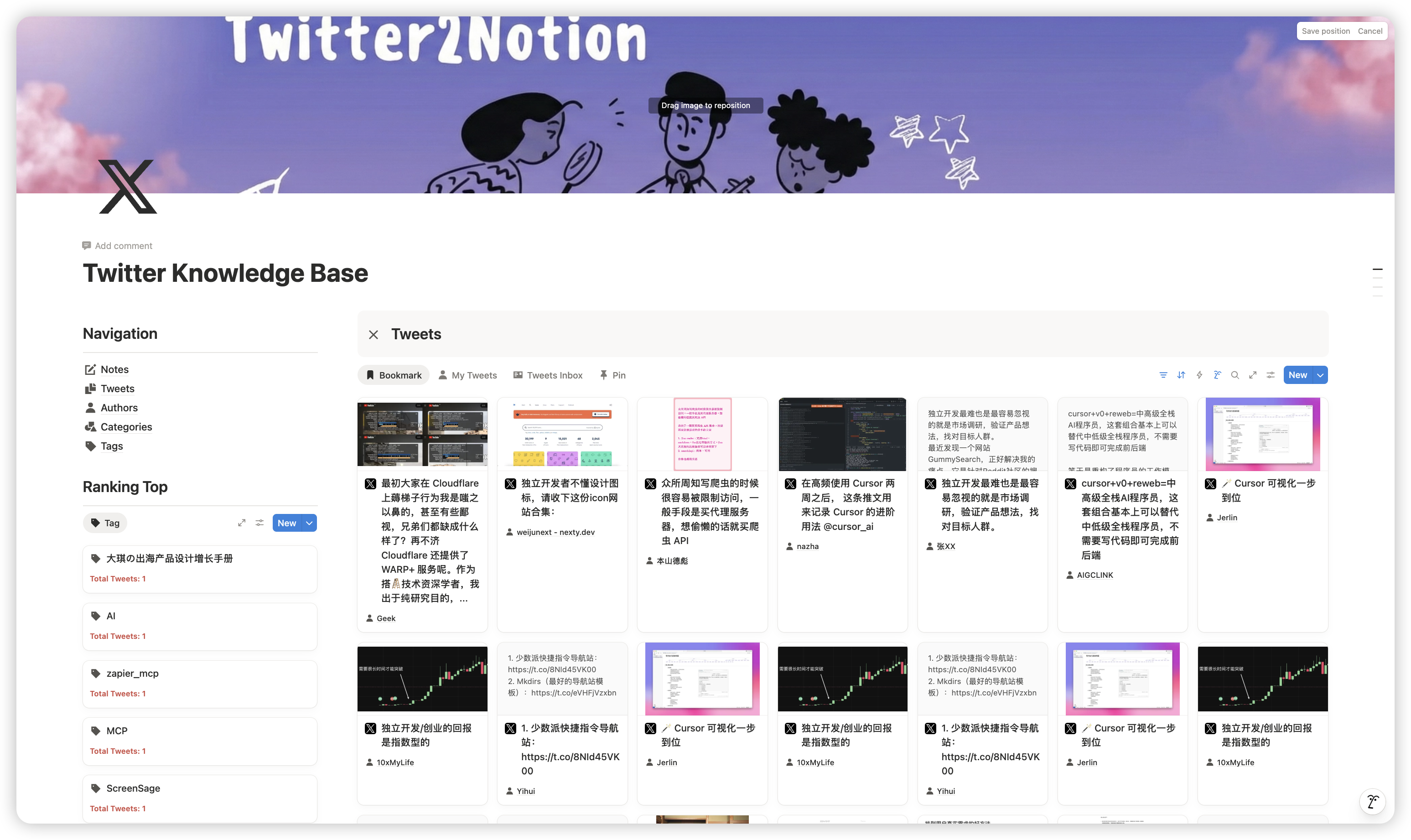
Bookmarks + Tweets Auto-Sync
Bookmarks and personal tweets synced to Notion with one click, incremental auto-sync requires no manual action.
Complete Thread Sync
Automatically detects Thread chains and captures all replies, merging them into a single complete Notion page.
AI Auto-Classification + Tags
Supports OpenAI, Gemini and other models to automatically classify and tag tweets. Requires your own API Key.
Simple, One-Time Pricing
Try 10 free syncs in the extension. Buy once to unlock unlimited syncs forever — no subscription.
Free
Perfect for trying out our sync service
- 10 free syncs
- All tweet types (Tweets, Threads, Articles, Images, Videos)
- Image upload to Notion
Lifetime
One-time purchase, yours forever
- Unlimited syncs
- AI classification
- Full & incremental sync
- Priority support
One auth code unlocks unlimited syncs permanently. Enter it in the extension after purchase.
They Are Already Using It
See how other users rate X2Notion's sync experience.
“I synced all my bookmarked tweets with X2Notion. Finally no more worrying about losing deleted tweets. The AI classification feature is so convenient — it automatically sorts my tech, product, and design tweets.”
“The Thread sync feature is the best I've seen. A complete Thread gets merged into one Notion page, and the reading experience is fantastic.”
“As a heavy Twitter user, I bookmark tons of tweets every day. With X2Notion, bookmarked tweets auto-sync to Notion — searching and reusing content is so easy.”
“Supporting X Article sync is really great. Long-form content is fully preserved in Notion with good formatting.”
FAQ
Frequently asked questions about X2Notion. If you have other questions, feel free tocontact me
Why doesn't anything happen after toggling the sync switch?
Why doesn't anything happen after toggling the sync switch?
1. Check if https://api.notion.com/v1 is accessible. If not, switch networks or use a proxy and try again. 2. Make sure X/Twitter is logged in and active in the browser. 3. Check if you've modified the copied Notion template's properties or names — if so, restore or re-copy the template.
Sync stopped after running for a while?
Sync stopped after running for a while?
1. Check if X/Twitter has logged out in the browser — log back in and it should work. 2. Check if X's rate limit was triggered — if prompted, turn off the switch, wait a while, then re-enable. 3. Make sure the extension is up to date — older versions may have compatibility issues.
What content types are supported?
What content types are supported?
Short tweets, long tweets (Note Tweet), Thread chains, X Articles, images, videos, embedded links, and all other major content types.
Which AI models are supported for classification?
Which AI models are supported for classification?
OpenAI, Gemini, DeepSeek, Qwen and other mainstream AI models are supported. Users need to provide their own API Key. The AI automatically classifies tweets and adds tags.
How are Threads synced?
How are Threads synced?
The extension automatically detects self-referencing tweets (Threads), captures all replies in the Thread, and merges them into one complete Notion page, maintaining reading continuity.
How are X Articles handled?
How are X Articles handled?
X Articles use Draft.js format. The extension parses them into Markdown, then converts to Notion blocks, fully preserving article structure and formatting.
How often does it sync?
How often does it sync?
20 tweets every 10 minutes.
How to switch X accounts for syncing?
How to switch X accounts for syncing?
To sync another X/Twitter account's data, uninstall and reinstall the extension, then switch to the other X login account.
Start Syncing to Notion Now
Join fellow information managers. Turn X/Twitter tweets into your Notion knowledge base — create, search, and reuse, all in one step.
Supports Chrome & Edge browsers · Full Thread sync · Data permanently saved